BIMI: how to get your logo next to your emails
BIMI (Brand Indicators for Message Identification) lets a mailbox show your logo next to your emails. You publish a TXT record that points to your logo, and receivers that support BIMI display it, but only if your domain enforces DMARC. Some inboxes also require a paid certificate, and Outlook shows no BIMI logos at all. Check which of your readers would actually see it before you start.
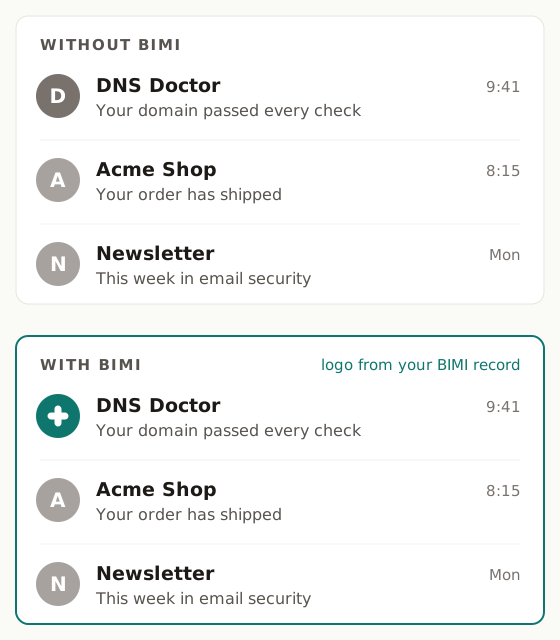
Where the logo shows, and what each inbox needs
| Mailbox | Shows a BIMI logo? | What it needs |
|---|---|---|
| Gmail | Yes | DMARC enforcement plus a VMC or CMC certificate |
| Apple Mail | Yes | DMARC enforcement plus a VMC (whether a CMC is accepted is not confirmed) |
| Yahoo and AOL | Yes | DMARC enforcement and a self-asserted record, no certificate. Shown for bulk senders with a good reputation |
| Fastmail | Yes | DMARC enforcement and a self-asserted record, no certificate |
| Outlook | No | Nothing you can publish today |
"Self-asserted" means a BIMI record and a valid logo with no certificate behind them. It is free, and it is enough for Yahoo, AOL and Fastmail. For Gmail it is not. If Gmail is the inbox you care about, read Can you get your logo in Gmail without a VMC? for what works without a certificate.
The four requirements, in order
1. DMARC at quarantine or reject
BIMI only works for a domain whose DMARC policy is p=quarantine or p=reject, on the From domain and its organisational domain. A subdomain policy of sp=none or a pct below 100 does not count. At p=none no receiver will show your logo, whatever else you publish.
Getting there is the risky part: a policy that is too strict too early sends your own mail to spam. DNS Doctor raises your policy only on evidence:
- A free scan recommends at most
p=quarantine, and only when it sees signs that your mail aligns. p=rejectnever comes from a scan. It comes only from DMARC report readiness, built from the aggregate reports your domain receives over time.
p=quarantine is enough for BIMI. You do not need to rush to p=reject for a logo. The full ladder is explained in How to get DMARC to p=reject without breaking email, and What is DMARC? covers the basics.
2. A logo in SVG Tiny PS
BIMI logos must be an SVG in a strict profile called SVG Tiny Portable/Secure (SVG Tiny PS). A normal design-tool export almost never passes. The rules that trip people up:
- Square, with a solid background (a transparent background can render badly).
- At most 32 KB.
- A
<title>element, and no scripts, embedded images, styles or links to outside files. - At least two colours.
The free SVG Tiny PS converter takes your SVG and rewrites it to the profile, or tells you exactly why it cannot. It only accepts SVG. A PNG or JPG cannot be converted reliably, because tracing a picture changes the shapes, and a traced logo will not match a trademark. Ask your designer for the vector file instead.
3. Host the logo at an HTTPS URL
The logo has to live at a public https:// address that serves it directly, without redirects. Any host works. If your domain is verified in DNS Doctor, you can upload the logo in the dashboard and we host it for free. Each upload gets its own fixed address, so the file behind your record never changes under you.
4. Publish the default._bimi TXT record
The record goes at host default._bimi on your domain. It starts with v=BIMI1, has an l= tag with your logo URL, and, if you have a certificate, an a= tag with the URL of the certificate file. An illustrative shape, for a made-up domain:
default._bimi.example.com TXT "v=BIMI1; l=https://example.com/logo.svg;"
Do not copy that line. The BIMI checker generates the exact record for your domain, with your real logo URL, once your DMARC policy is at enforcement. It refuses to generate one before then. You publish every record yourself. If you have not added a TXT record before, How to add a TXT record walks through each DNS provider.
Certificates: VMC and CMC
Gmail, and Apple Mail, only show your logo if your record points to a mark certificate. There are two kinds:
- VMC (Verified Mark Certificate) needs a registered trademark for the logo.
- CMC (Common Mark Certificate) needs no trademark, but the logo must have been in public use for at least 12 months. The issuer checks this against web archives.
Both involve identity checks that only you can do: signing a statement, a live video call to confirm who you are (or a letter from a notary or lawyer), and a callback on a phone number or address listed independently of you. Expect roughly $650 to $1,600 a year and two to four weeks from order to certificate. Issuers listed by the BIMI Group include DigiCert, GlobalSign and SSL.com.
Once you have a certificate, the logo you host must be byte-for-byte the same file as the one inside the certificate.
Why a valid record can still show no logo
A record that passes every check does not guarantee a logo. The common reasons:
- Caching. Mailbox providers cache what they find. A new or changed logo can take a day or two to appear.
- An empty or missing
a=. Without a certificate, Gmail and Apple Mail show nothing. That is expected, not a fault in your record. - A transparent background. Use a solid background in the logo itself.
- Reputation. Yahoo and AOL show self-asserted logos only for bulk senders with a good sending reputation.
- The certificate logo does not match. If the hosted SVG differs from the one embedded in your certificate by even one byte, a receiver can refuse to show it.
The BIMI checker reads your DMARC policy, your BIMI record, the logo and, if present, the certificate, and tells you which of these applies.
Start here
- Scan your domain to see where your DMARC policy stands.
- Convert your logo with the SVG Tiny PS converter.
- Run the BIMI checker for your record and a per-mailbox view of where the logo will show.
Check SPF, DMARC, DKIM, MX, DNS health, blacklists and domain & SSL expiry in one free scan — with the exact record to paste in to fix each problem.