Can you get your logo in Gmail without a VMC?
Not as a logo for your whole domain. Gmail shows a brand logo for every address on a domain only through BIMI, and only when your BIMI record points to a VMC or CMC certificate. A self-asserted BIMI record, with no certificate, shows nothing in Gmail. There is no setting, header or trick that changes that. What Gmail can show without one is a profile photo, one sending address at a time.
What you can do without a certificate is get your logo in front of readers on other inboxes, and put a photo on the address you send from. This page covers each route, what it costs, and where it shows.
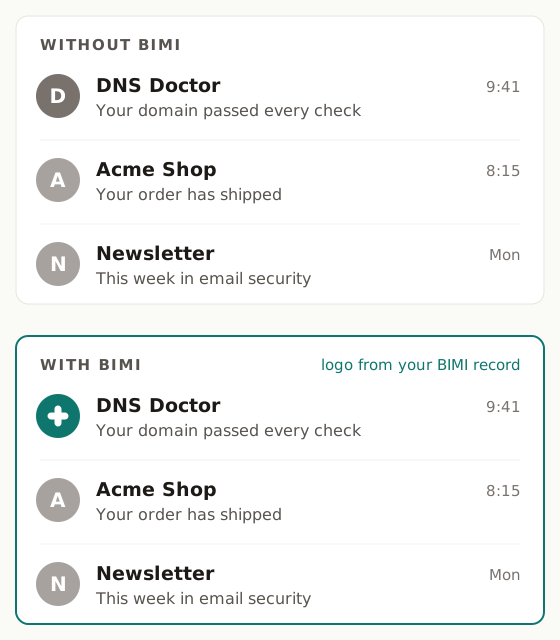
The short version
| Route | Cost | Where it shows | Needs |
|---|---|---|---|
| Self-asserted BIMI | Free | Yahoo, AOL, Fastmail | DMARC at quarantine or reject, a valid SVG Tiny PS logo, a BIMI record |
| Apple Branded Mail | Free | iPhone Mail and iCloud Mail on the web | Your organisation verified by Apple, DKIM and DMARC |
| Google Account profile photo | Free | Gmail apps' inbox list; the opened message and hover card on the web | A Google Account for the exact From address, photo visible to "Anyone", mail passing SPF or DKIM |
| BIMI with a VMC or CMC | About $650 to $1,600 a year | Gmail, Apple Mail, and the inboxes above | DMARC enforcement, a certificate, identity checks |
| Outlook | - | Nowhere | No route today |
Yahoo, AOL and Fastmail: self-asserted BIMI
Yahoo, AOL and Fastmail show BIMI logos without a certificate. You need three things:
- DMARC at enforcement. Your policy must be
p=quarantineorp=reject. Atp=nonenothing shows. DNS Doctor only recommends a stricter policy when it has evidence your own mail will pass. A scan goes as far asp=quarantine, andp=rejectcomes only from DMARC report readiness. Quarantine is enough here. - A valid logo, hosted over HTTPS. BIMI needs a square SVG in the SVG Tiny PS profile, at most 32 KB, with a solid background. The free SVG Tiny PS converter rewrites your SVG to the profile. If your domain is verified in DNS Doctor, you can host the logo with us for free from the dashboard.
- A BIMI record at
default._bimion your domain, pointing to the logo. The BIMI checker generates the exact record once your DMARC policy qualifies. You publish every record yourself.
One limit on Yahoo and AOL: they show self-asserted logos for bulk senders with a good sending reputation. A small domain that sends a few messages a day may publish everything correctly and still see no logo there.
This is also the first half of the certificate route. If you later buy a VMC or CMC, you add its URL to the same record as an a= tag. The full walkthrough is in BIMI: how to get your logo next to your emails.
Apple Branded Mail
Apple runs its own route, separate from BIMI. Through Apple Business Connect you can register your organisation for "Branded Mail". It is free. Apple verifies your organisation itself, and your mail must pass DKIM and DMARC.
Once approved, your logo shows in Mail on iPhone and in iCloud Mail on the web. It does not show in Gmail, and it does not replace BIMI for other inboxes. If many of your readers use iPhones, it is the one free route that reaches Apple's own mail app.
Gmail: the Google Account profile photo
The one thing you can put in Gmail without a certificate is the profile photo of a Google Account. If the address you send from is a Google Account (a Google Workspace user, or a personal account created with "Use your existing email"), set its profile photo and make it visible to "Anyone" in the account's settings.
Be clear about what this is:
- It is a photo of one address, not a brand logo for your domain. Every sending address needs its own account and its own photo.
- It must be the exact From address. A "Send mail as" alias does not count: in our own test on 2026-10-20, mail sent from an alias showed only the letter avatar, while the account's own address showed the photo.
- Where it shows: in the Gmail apps (Android and iOS) it can appear in the inbox list. On Gmail on the web it shows in the opened message and in the hover card over the sender's name, not in the inbox list.
- Your mail must pass SPF or DKIM for the address, or Gmail falls back to the letter avatar.
- A change takes 24 to 72 hours to appear.
- In Google Workspace, a photo an admin sets for a user reaches only people that user already interacts with. For everyone else, the user sets it themselves with visibility "Anyone".
- Google does not document it as a BIMI substitute, so it can change without notice.
It is worth doing for a founder's or support address, because it costs nothing. Just do not expect it to look like a BIMI logo on every message from your domain.
Outlook
Outlook shows no BIMI logos, with or without a certificate. There is nothing to publish for it today.
If Gmail matters most
Then the answer is a certificate. A VMC needs a registered trademark for the logo. A CMC needs no trademark, but the logo must have been in public use for at least 12 months. Both involve identity checks only you can do, such as a live video call and a callback on an independently listed phone number, and both run about $650 to $1,600 a year. Everything else on this page still applies, so the free steps are not wasted.
Where to start
- Scan your domain to see where your DMARC policy stands. Enforcement comes first on every route here.
- Convert your logo with the SVG Tiny PS converter.
- Run the BIMI checker to see, mailbox by mailbox, where your logo would show today.
Check SPF, DMARC, DKIM, MX, DNS health, blacklists and domain & SSL expiry in one free scan — with the exact record to paste in to fix each problem.