DMARC monitoring that tells you the day something needs a new record
The scan finds what's wrong today. Monitor keeps watching after the scan: it re-reads your domains every day, reads the reports your receivers send back, watches the names registered to look like yours, tells you the day something breaks — and shows you when it's safe to tighten.
Not sure yet? Scan a domain first →
What Monitor watches
The registration and the certificate are read on every scan — the domain at 30, 14, 7 and 1 days out, the certificate at 14, 7 and 1. It is the outage nobody is monitoring for, because it isn't a mail problem until it is.
Every authentication record is diffed against the last good copy, so a contractor's quick fix over the weekend isn't discovered by a bounced invoice on Monday.
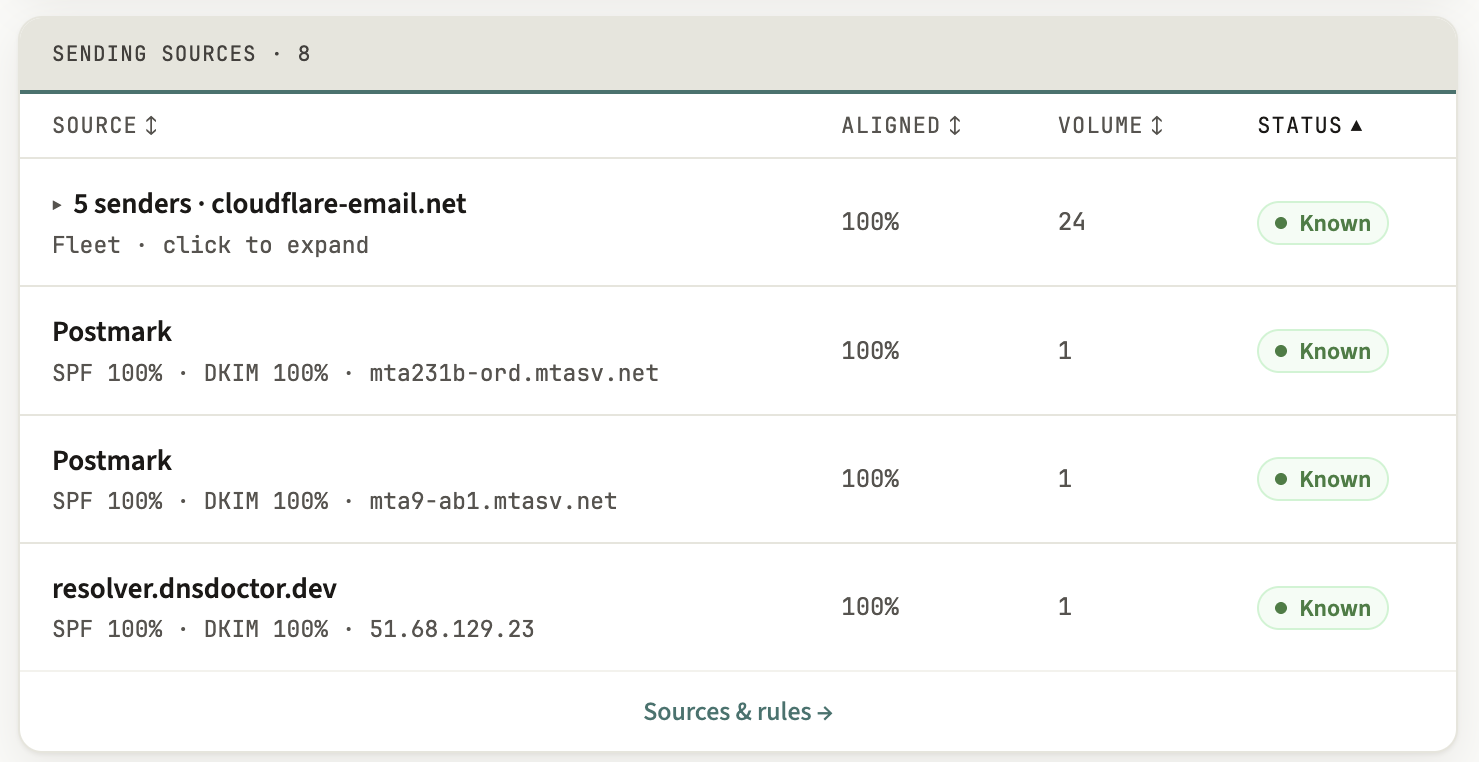
Your aggregate reports name every server sending as your domain. One that has never appeared before is surfaced once — and where reverse-DNS shows the hosts are siblings, a rotating cloud fleet folds into one finding rather than forty. Once a domain is enforcing, the dashboard still logs every one of them; the email is saved for the ones that aren't authenticating and keep coming back.
Your mail servers are checked against reputable blocklists through our own dedicated resolver, with a strict whitelist of listing codes — an ambiguous answer is reported as not checked rather than as a false alarm.
A check that was passing and now isn't — an over-limit lookup chain, a policy quietly weakened back to monitor-only — is an alert the same day, not a mystery next quarter.
The domain's registration is read on every scan too, so a registrar transfer or a nameserver move is an alert — and one you didn't make can't quietly take every record with it.
Close variants of your name are checked daily and scored for risk. Most turn out parked or unrelated, so only one that reaches high triggers an email. Newly found ones are listed on the dashboard and counted in the next day's alert email, if one goes out.
Check from six locations that the new record is live, and leave a free watch on it for up to 24 hours — so you know it landed rather than hoping it did.
Findings for a domain arrive batched — one message per check, not one per event — and the routine alert types can each be silenced if they aren't yours to act on. Three always reach you: a record that has been deleted and a domain we can no longer read, which both mean your mail is already broken, plus the one-time nudge when a domain you enrolled has not published its reporting record yet.
Every sender, aligned or not
Publish a reporting address and every mailbox provider that supports DMARC reporting starts sending a daily report naming who sent as your domain. They arrive as compressed XML that nobody reads.
Monitor reads them for you and turns them into one table: each sending source, how much it sent, what share of it authenticated, and what receivers actually did with the rest. Sources you recognise get a name and stop asking for attention; the ones you don't stay flagged until you decide whether they are yours.
The safe path to a policy that actually blocks
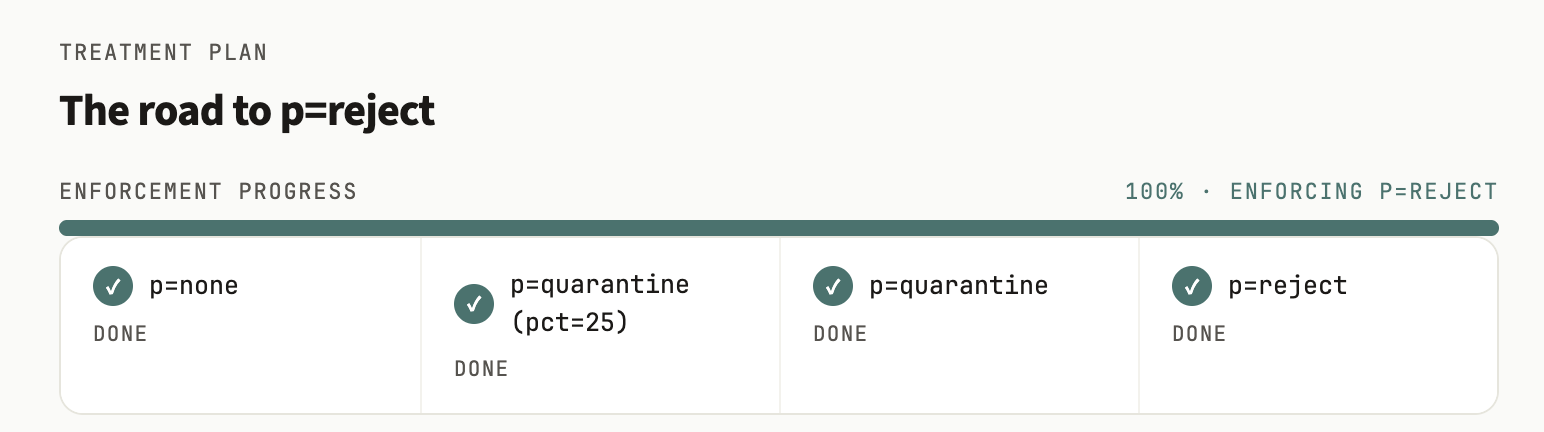
Moving from monitor-only to quarantine, and then to reject, is not a setting you flip — it is a claim about your own mail. Get it wrong and you block your invoices, not the forgeries.
So Monitor earns it from evidence. Over a trailing 30-day window every known sender — the providers we recognise as well as the ones you have named yourself — has to be authenticating at least 99% of the time, and the volume nobody can account for — the part of it that isn't authenticating — has to stay under half a percent. Only then does the next step unlock, one rung at a time. An empty window is never treated as ready.
The reports themselves have to be attributable, too. The reporting address in a DMARC record is public, so anyone can mail a report to it — we authenticate each report's own message and count only the ones from a receiver on our verified list — or that you uploaded yourself. Anything else is stored and shown, labelled unverified, and moves no verdict. Reject, which turns forgeries away outright, asks for one thing more: at least three separate days of that evidence.
The record for that step is written by the same deterministic engine that writes the scanner's fixes — never by the AI layer, which only ever explains. You paste it yourself: we hold no write access to your DNS, and never will.
On the trial you can see when a domain is ready for reject. The record for that last step comes with Monitor or the one-time package.
Names registered to look like yours
Enforcement stops forged mail that uses your exact domain. It does nothing about a name one letter off, with an extra word or a different ending, that someone else registered. Monitor checks those close variants of every verified domain once a day, starting within a day or so of verification and before any reports arrive.
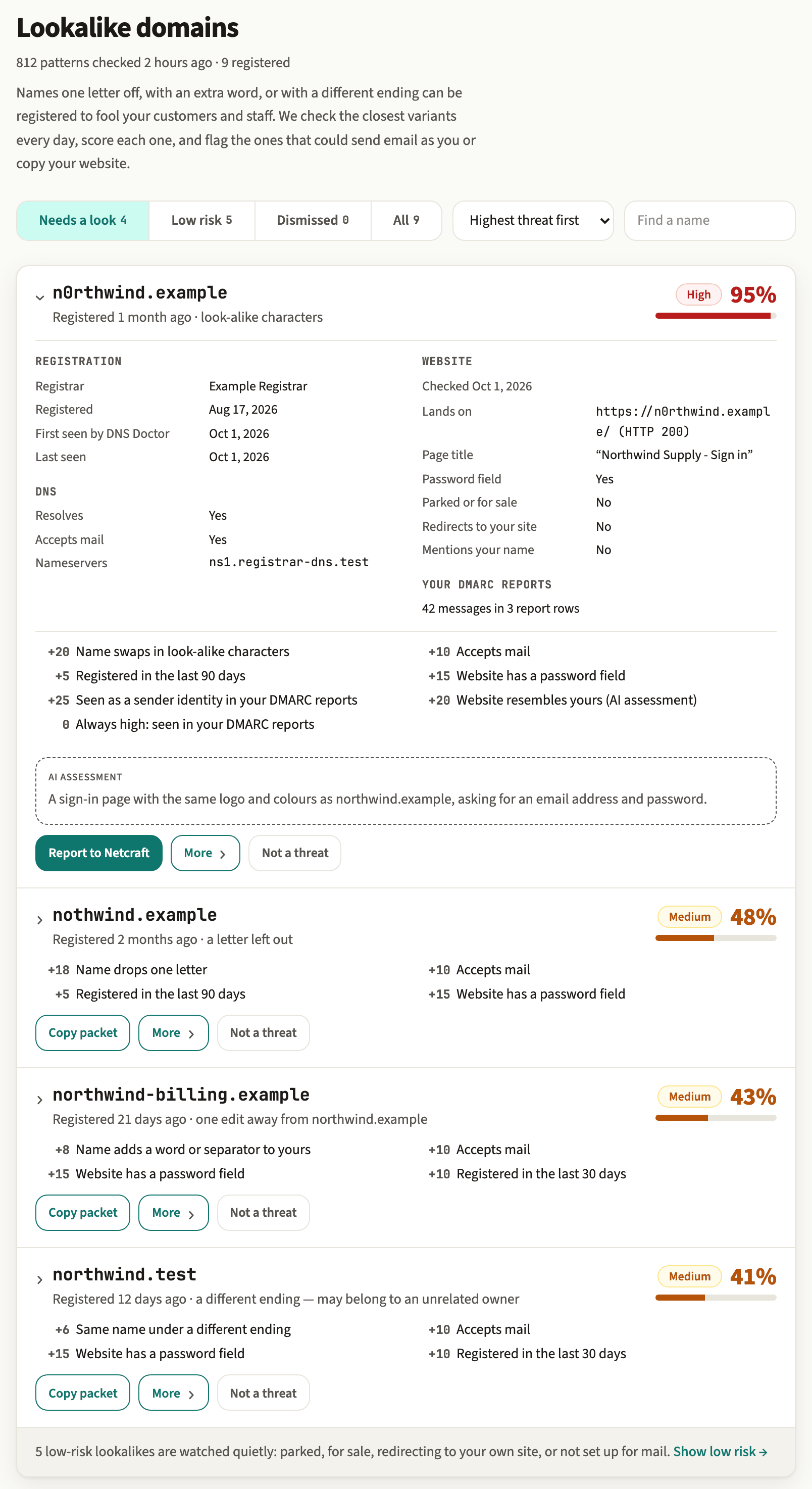
Most registered lookalikes are harmless: parked, for sale, pointing back at your own site, or owned by someone unrelated with a similar name. So each one gets a threat score out of 100, and every point is listed: how easily the name is mistaken for yours, whether it is set up to receive mail, how recently it was registered, what its website shows, and whether it turns up in your own verified DMARC reports. A name behind mail that claimed to be you and failed authentication scores high on that alone. One that redirects to your own site stays near zero.
Part of the score can come from an AI comparison of the lookalike's homepage with yours. It is worth at most 30 of the 100 points, it can't move a score past what the evidence allows, and its summary is labelled as AI.
A lookalike that crosses into high triggers an email. Newly found ones are listed on the dashboard and counted in the next day's alert email if one goes out, but never send one by themselves. For a medium or high one, Monitor puts what we observed into an evidence packet for you to file with the registrar's abuse desk, Google or Microsoft, and with Netcraft once it is high. Reports go in under your name, and nothing is sent until you confirm. What happens to the name after that is up to them.
How it works
Paste it into the dashboard — up to ten of them. Nothing at your registrar changes yet: adding a domain just hands you the one record the next step needs.
Publish that TXT record, then press check. It proves the domain is yours — nobody can point our monitoring at someone else's mail. The first scan runs as soon as it checks out, so you have a grade and a diagnosis straight away.
Add our reporting address to your DMARC record. If you already have one, we merge it in so nothing else about the record changes; if you don't, we hand you a minimal monitor-only record to publish instead. Already sitting on an archive of reports? Upload it and the dashboard fills in instantly rather than waiting a day.
- 10 domains — enough for an agency's whole client roster
- Unlimited report volume and unlimited re-scans
- 12 months of history and report retention
- Every alert type on by default, and the routine ones silenceable one by one
- More than 10 domains? Get in touch — MSP and agency volume is welcome
- Just one domain to move to enforcement? DMARC enforcement, done with you gives you each step's record as your reports prove it safe, for up to 90 days, $99 paid once. It doesn't include the lookalike watch.
The free scanner stays free, with or without a subscription. See the full plan comparison.
Common questions
What is DMARC monitoring?
Publishing SPF, DKIM and DMARC records is a one-time change; keeping them correct is not. Records get edited, new tools start sending as you, certificates and registrations lapse — and the reports receivers send back are the only place most of it is visible. Monitoring is the ongoing half: your domains are re-read every day, those reports are read for you, and you hear about a problem when it appears rather than when a customer says an email never arrived.
How is this different from reading my DMARC reports myself?
The reports arrive as compressed XML, one file a day from each provider that sends them, and they only describe what happened — never what to do about it. Monitor keeps them, turns them into one table of sending sources with volume and authentication share, folds a rotating cloud fleet — where reverse-DNS shows the hosts are siblings — into a single finding instead of forty, and pairs all of it with a daily re-read of the records themselves. It then uses that evidence to decide when tightening your policy is actually safe.
Do I need to give you access to my DNS?
No — and you cannot. Monitor reads your DNS from the outside, exactly as a receiving mail server does. Every record we generate is one you copy and publish yourself: there is no auto-apply, and we hold no write access. All you publish for us is a verification record proving the domain is yours, plus our reporting address in your DMARC record.
How quickly do alerts arrive?
Every monitored domain is re-scanned daily, and everything it finds — a changed record, a sender you have never seen, a blocklist listing, an approaching expiry — arrives as one message rather than one per finding. Once a domain is enforcing, a new sender that is authenticating correctly is logged to the dashboard instead of mailed, and one that isn't has to keep appearing before it earns an email — the point of enforcement is that this traffic is already being rejected for you. The routine alert types can each be switched off on their own; three always reach you — a deleted record and a domain we can no longer read, which both mean your mail is already broken, plus the one-time nudge when a domain you enrolled has not published its reporting record yet. Muting a finding in the dashboard stops it repeating.
What happens when a lookalike of my domain turns up?
It goes on your dashboard with a threat score and the facts behind it. Most registered lookalikes are parked or belong to someone unrelated, so nothing is reported automatically. Only a lookalike that reaches high risk triggers an email. Newly found ones are counted in the next day's alert email, if one goes out. For a medium or high one you get an evidence packet of what we observed, to file under your own name with the registrar's abuse desk, Google or Microsoft, and with Netcraft once it is high. Whether anything happens to the name after that is up to them.
Is report volume really unlimited?
There is no volume metering and no per-message pricing, ever — you are never charged by how much mail your domains send or how many reports come back. What exists instead is an anti-abuse ceiling: 100 MiB of raw report data per domain per day, which is thousands of reports and far above what a real domain produces, and a 25 MiB cap on any single report file. Report mail past the daily ceiling is deferred rather than dropped: the sending provider is asked to try again later, and it does.
What happens when the trial ends?
Monitoring pauses and your history stays visible in case you come back. The free scanner keeps working, and no card was taken, so nothing is charged.
Which DNS and email providers does it work with?
All of them. Everything is done from public DNS and from the aggregate reports that providers supporting DMARC reporting send back once you publish a reporting address. There is nothing to install and no provider has to support us specifically — if you can edit your domain's DNS records, wherever they are hosted, it works.